
Build your own user manual
People are not telepaths. Things run better with a README.

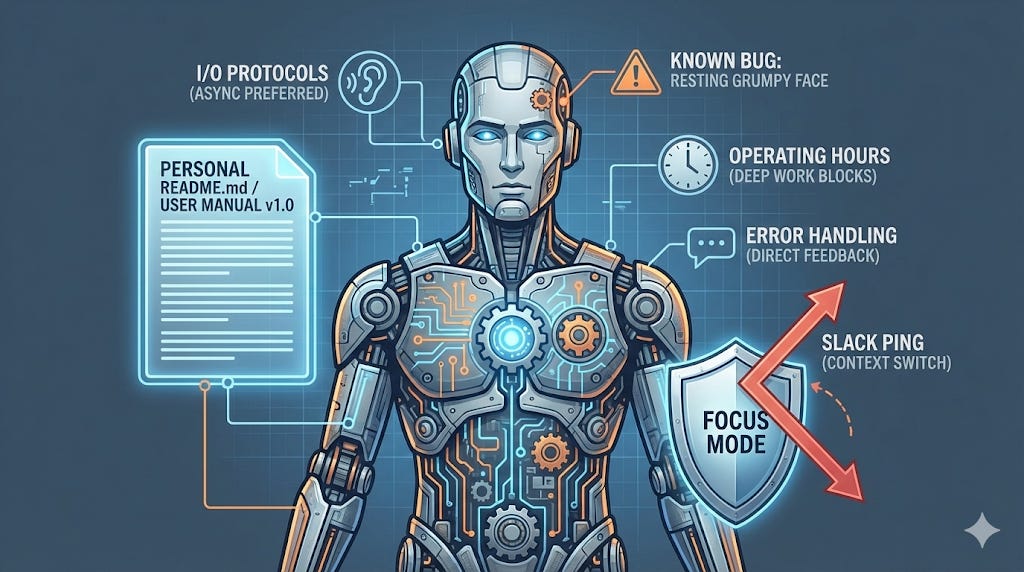
Perhaps you are familiar with this situation:
You are seven levels deep in a stack trace, holding the entire mental model of a distributed system in your head. You are about to finally nail that threading issue. Suddenly, a generic “Ping” pops up on Slack.
The house of cards collapses. The context is gone. An hour of focused layering has evaporated because someone wanted to know where the Wiki link for the holiday party is.
If only that ping didn’t happen. You could turn off chat, but then people get mad that you are “unresponsive.” You could mark “Focus Time” on your calendar, but nobody looks at calendars before sending a DM.
Here is the reality: People are not telepaths.
They do not know that you work best in 4-hour blocks. They do not know that you prefer direct feedback over the “compliment sandwich.” They do not know that when you stare blankly during a meeting, you are actually processing, not ignoring them.
The solution is to do what engineers do best: Write documentation.
You need a Personal README.
When you ship a library, you include a README so other developers know how to interface with your code. You are a complex system. You deserve a manual, too.
The Specification: What Goes into a Personal README
Do not treat this as a biography. Nobody cares about your favorite color or your middle school crush (unless that crush is relevant to the Q3 roadmap).
Treat this as API Documentation for your personality. Here are the essential sections:
1. Communication Protocols (I/O)
How do people get data in and out of you efficiently?
The “No Hello” Rule: Be explicit. “Do not send me a message that just says ‘Hi’. I will not answer. Send the ‘Hi’ and the question in the same block. Reduce the latency of our handshake.”
Channel Preference: “If it is urgent, call me. If it requires a decision, email me so there is a paper trail. If it is a quick question, Slack me.”
The “Interrupt” Flag: Define what constitutes an emergency. “If the site is down, interrupt me. If you can’t find a doc, search first.”
2. Operating Hours (System Availability)
We work in a global environment. Time zones are real.
Async by Default: “I work in [Timezone]. If you message me while I am sleeping, I will answer when I wake up. Do not expect real-time ACKs.”
Deep Work: “If my calendar says ‘Focus’, I am coding. Do not expect a reply for 2 hours.”
3. Feedback Mechanisms (Error Handling)
How should people tell you that you are wrong? This is crucial for avoiding drama.
Direct vs. Sugarcoated: “I am Slavic/Grumpy/Busy. I prefer direct feedback. You do not need to wrap your criticism in two compliments. Just tell me the bug so I can fix it.”
Debate Style: “I argue to learn. If I push back, I am stress-testing your idea, not attacking your character.”
4. Known Bugs (Quirks)
We all have defects. Documenting them prevents them from becoming interpersonal conflicts.
The “Processing Face”: “When I stare intensely at you during a meeting, I am not angry. I am trying to understand the complex thing you just said. Please do not be alarmed.”
The “Grumpy” Default: “I have a resting serious face. Unless I explicitly say I am unhappy, assume I am neutral.”
Context Switching: “I am bad at multitasking. If we are in a meeting, I am not checking email. Please do the same for me.”
5. For Managers: The Escalation Trigger
If you manage people, they need to know when to pull the Andon cord.
Bad News First: “Surprises are the enemy. If something is on fire, tell me now. I can help you put out a fire. I cannot help you reconstruct the ashes three weeks later.”
Deployment Strategy
Writing it is only half the battle. You have to publish it.
Pin it to your Slack/Teams/Chat profile.
Link it in your email signature.
Send it to new team members during onboarding.
Summary
This might feel narcissistic at first. It isn’t.
Narcissism is thinking everyone should just know how to treat you. Engineering is giving them the manual so they don’t have to guess.
Your README won’t solve every conflict. It won’t stop every interrupt. But it acts like WD-40 (or silicon lube for things exposed to dust) for team friction. It greases the gears so that when people interact with you, the machine runs just a little bit smoother.
Do you have your own README? What other techniques have you tried to help people understand how to interact with you? Please share your experience!
System Library: Further Reading
If you want to optimize your team’s interface:
The Concept: Manager READMEs
The Engineering Angle: A collection of open-source READMEs from leaders at Slack, HubSpot, and others. Don’t copy them; fork them.
The Tool: NoHello.net
The Gist: A polite website you can send to people who just say “Hi” and wait for an ACK.
The Book: Radical Candor by Kim Scott
Why It Matters: Scott teaches how to care personally while challenging directly. If your README says you prefer blunt feedback, this book explains how to give and receive it without destroying relationships. It’s about being honest without being a jerk (although initially you will feel like one).
The Video: “Your Communication Protocol Can Make or Break Your Team’s Productivity” with Theresa M. Ward (45 minutes)
Why Watch It: Covers async vs. synchronous communication, escalation triggers, and how to define what’s actually urgent. It’s a practical masterclass on the exact problem your README solves.
System Status: Critical?
Writing about management is theory. Fixing it is engineering.
If your organization is suffering from high latency, packet loss in communication, or structural debt, I provide Strategic Debugging and Leadership Mentoring.
I help you refactor your team like you refactor your code.
Review my operating parameters at weivco.com.
Nice work Vlad. Does it help with building backyard sheds? :)